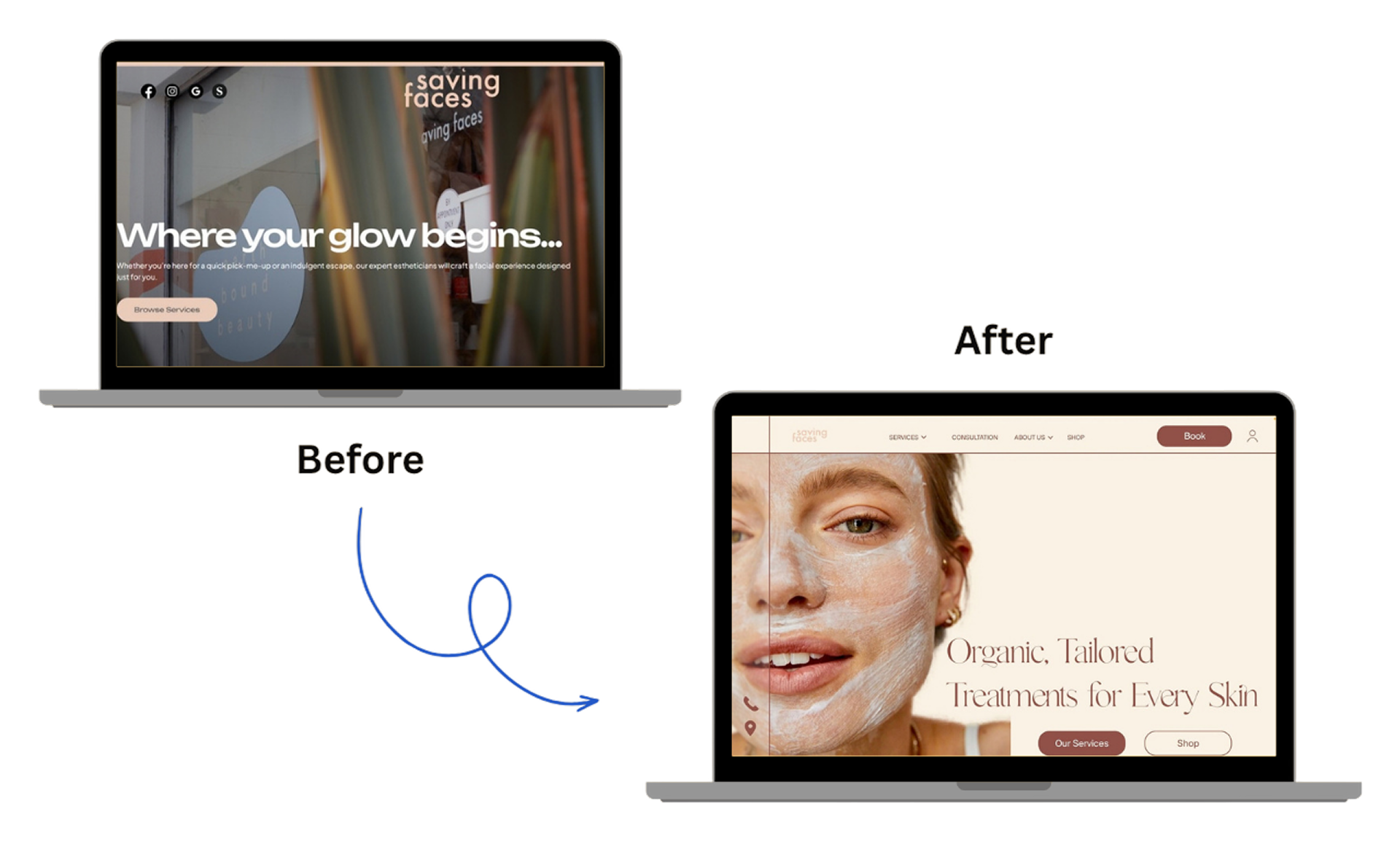
Saving Faces
Saving Faces needed an interface that matched the warmth of their work — approachable, clear, and trustworthy without feeling sterile.
02 — Context
Saving Faces is a skin clinic specialising in organic, tailored facial treatments. Their therapists are experienced, their approach is deeply personal — but their website told a different story. Dark photography, unclear navigation, and an interface that felt transactional made it hard for first-time visitors to feel comfortable enough to book.
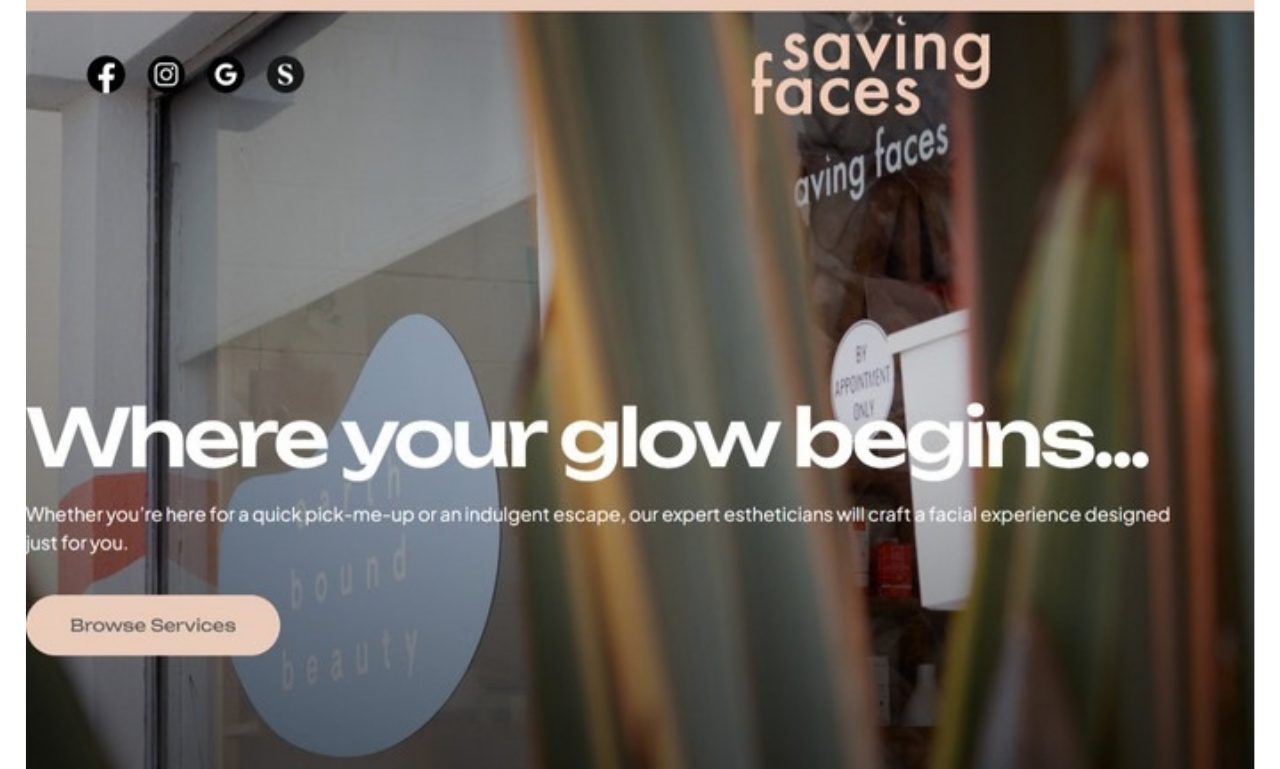
Walking into Saving Faces felt nothing like landing on their website.
03 — Business Needs & Design Goals
The clinic needed a digital presence that reflected the quality of care they offer in person — warm, trustworthy, and easy to navigate. The redesign had to convert first-time visitors into bookings without relying on discounts or pressure tactics.
04 — Design Method
The project followed the double diamond — diverging to understand the problem space, then converging on the right solution.
Discover
Heuristic evaluation
Stakeholder brief
Competitor review
Define
Problem statement
User personas
Design principles
Develop
Visual direction
Wireframes
Design iterations
Deliver
UI kit
Hi-fi screens
Final prototype
05 — Discover
The discovery phase focused on diagnosing the existing site's problems before jumping to solutions. Through a heuristic evaluation and user research, we mapped where visitors were losing trust, getting confused, or giving up entirely.
The site had the right services — it just couldn't communicate them.
Heuristic Evaluation
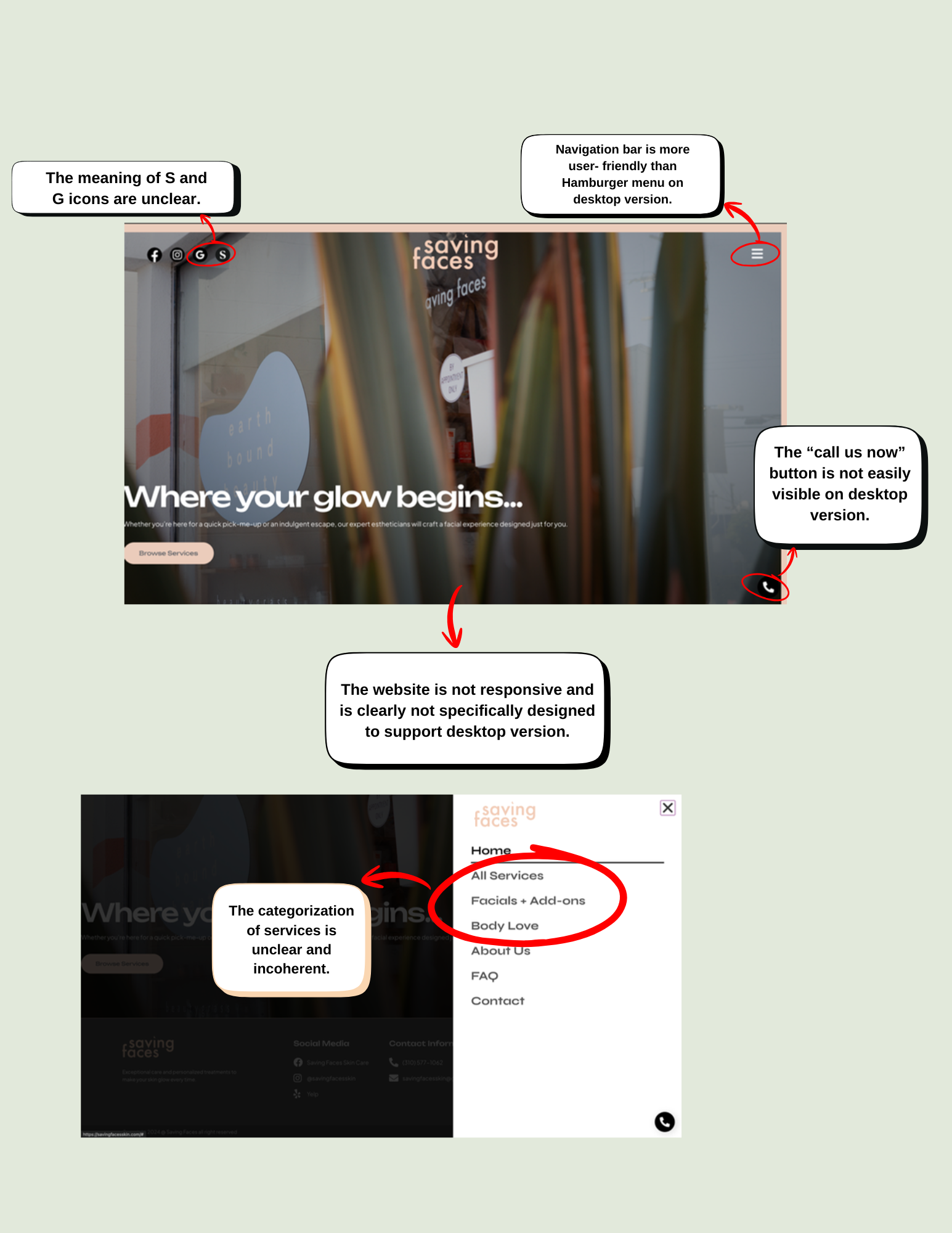
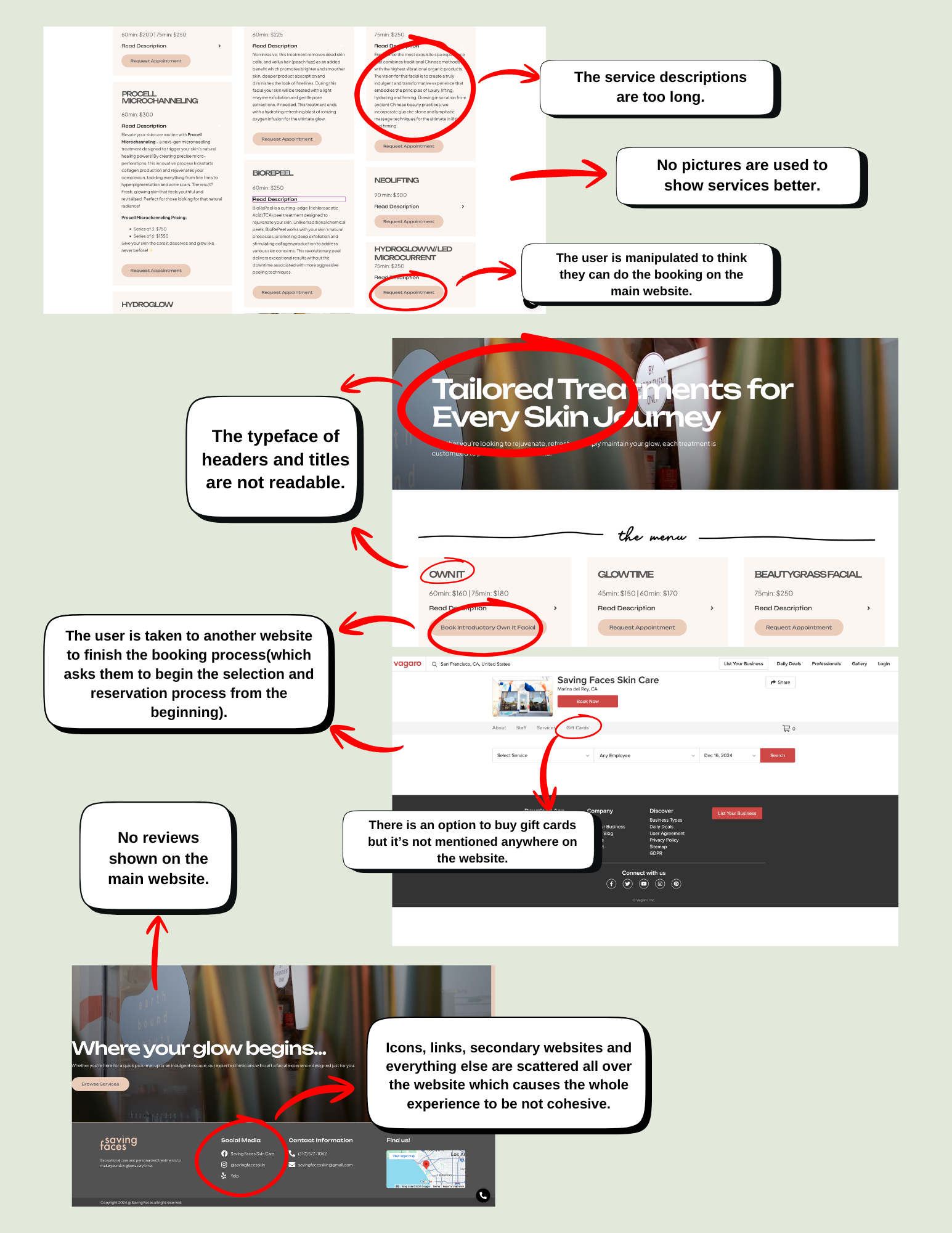
Walking through the existing site with Nielsen's heuristics surfaced problems at every stage. On the homepage, iconography was unexplained and the desktop navigation defaulted to a hamburger menu — burying the primary CTA from visitors who hadn't even committed to exploring. The service taxonomy mixed naming conventions ("Facials + Add-ons" alongside "Body Love") and descriptions ran long with no supporting imagery, making it hard to compare or understand what a treatment actually involved. The booking flow broke trust in the most damaging way: a button that appeared to initiate booking instead redirected users to a third-party platform, where they had to start the selection process from scratch. Social proof was absent on the main site, and a gift card option existed but was never surfaced. The overall result was a fragmented experience — scattered links, inconsistent type, and no single visual language tying it together.
User Interview
Interviews with potential clinic clients revealed a consistent pattern: people researching skincare treatments spend significant time building trust before they act. They want to understand what they're getting, who they're seeing, and what to expect — and the existing site answered almost none of those questions clearly. We used these findings to anchor every design decision that followed.
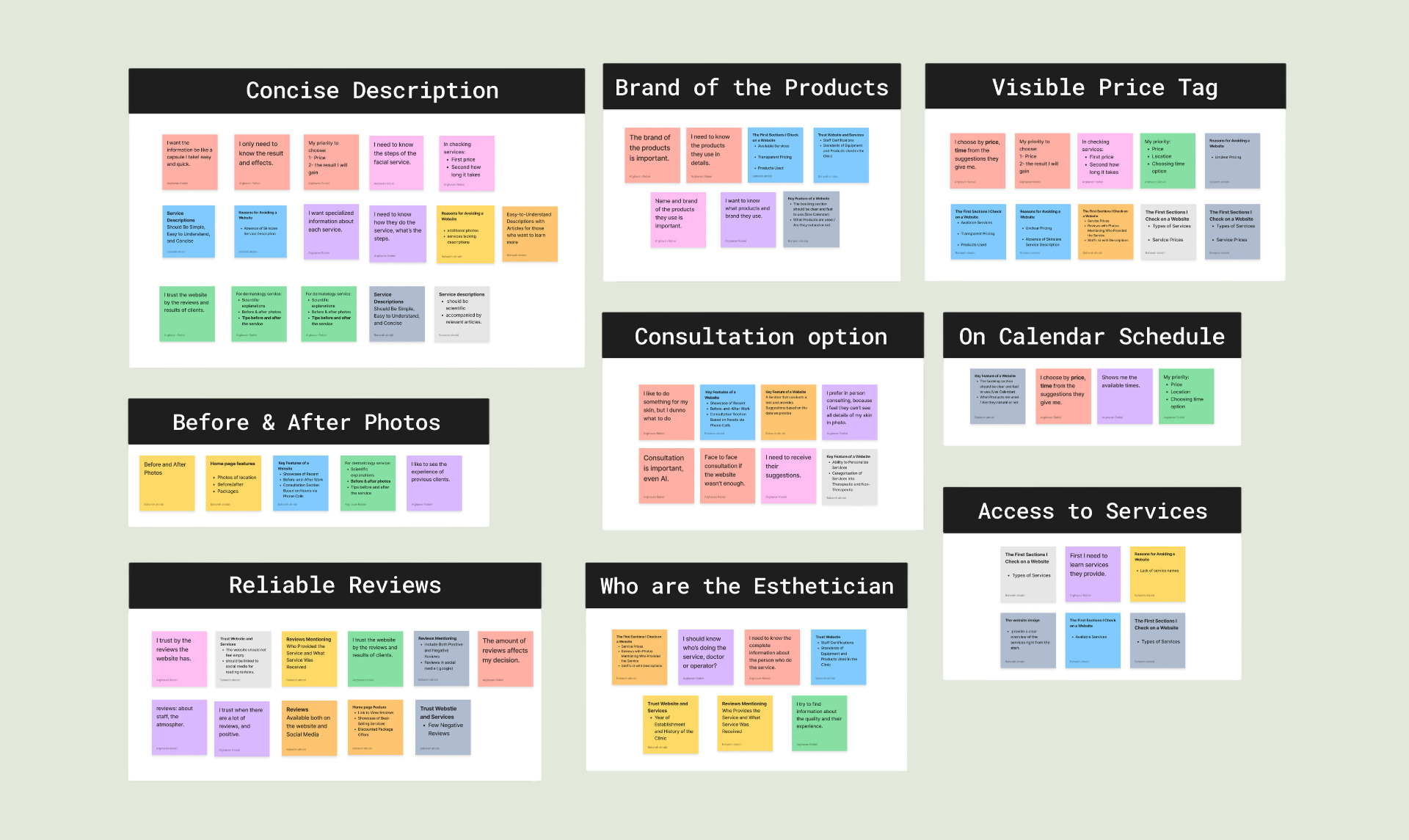
Clustering the notes surfaced nine recurring themes: concise service descriptions, visible pricing, before & after photos, product brand transparency, esthetician profiles, reliable reviews, a consultation option, on-calendar scheduling, and clear access to services. Trust signals — who does the treatment, what products are used, what past clients experienced — appeared across nearly every group. A visible consultation option and a real-time schedule were the two features most strongly associated with a willingness to book.
Competitive Analysis
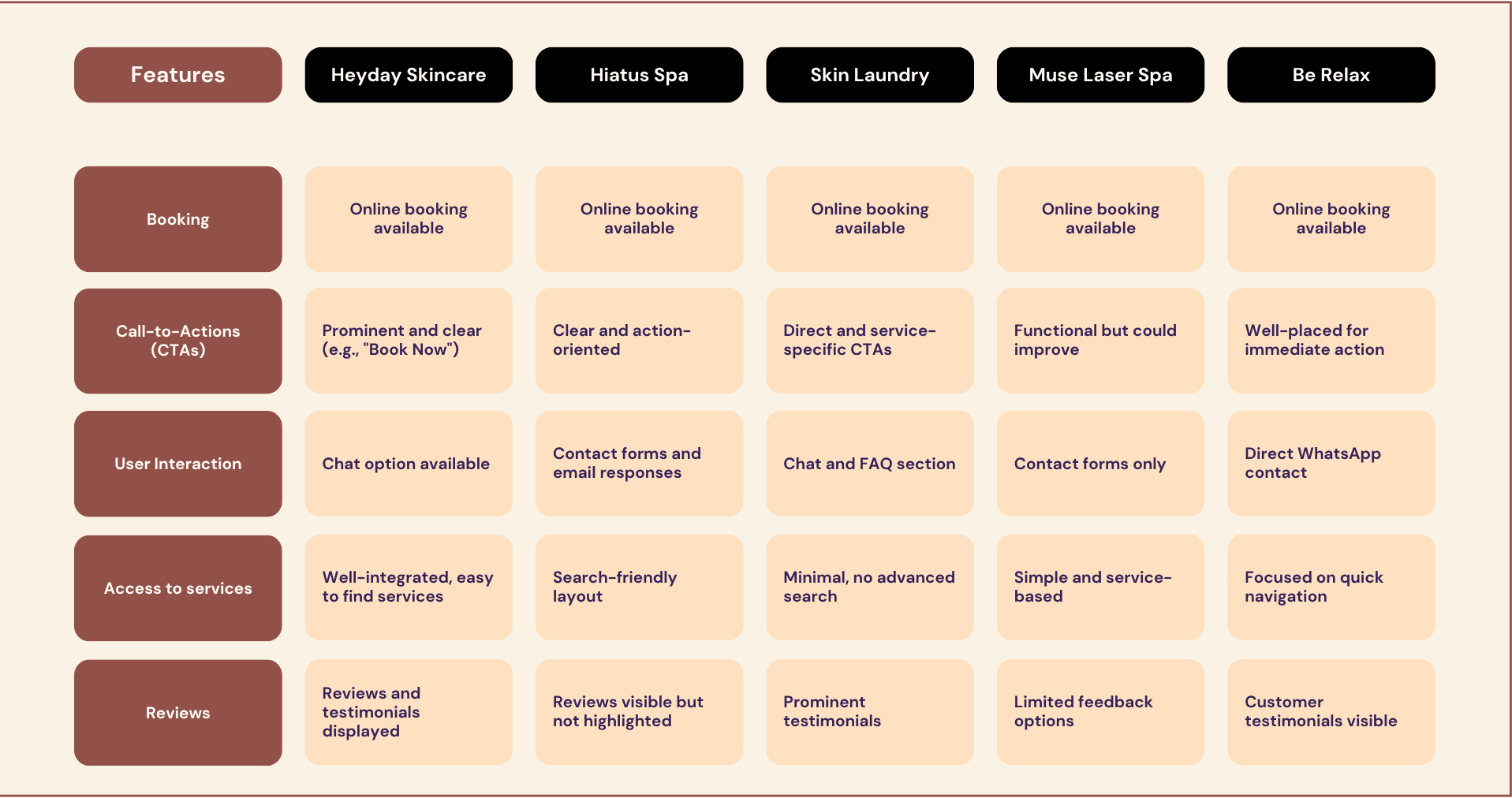
We benchmarked five competitors — Heyday Skincare, Hiatus Spa, Skin Laundry, Muse Laser Spa, and Be Relax — across five dimensions: booking, CTAs, user interaction, access to services, and reviews. The pattern was consistent: all five offered online booking without redirecting users off-site, all had clear and action-oriented CTAs, and most surfaced reviews and testimonials prominently rather than hiding them. The strongest performers (Heyday, Skin Laundry) made services easy to find and paired each one with direct booking options. These gaps made the redesign brief concrete — Saving Faces needed to match the baseline its competitors had already set, then go further with the warmth and detail its in-person experience already delivered.
Card Sorting
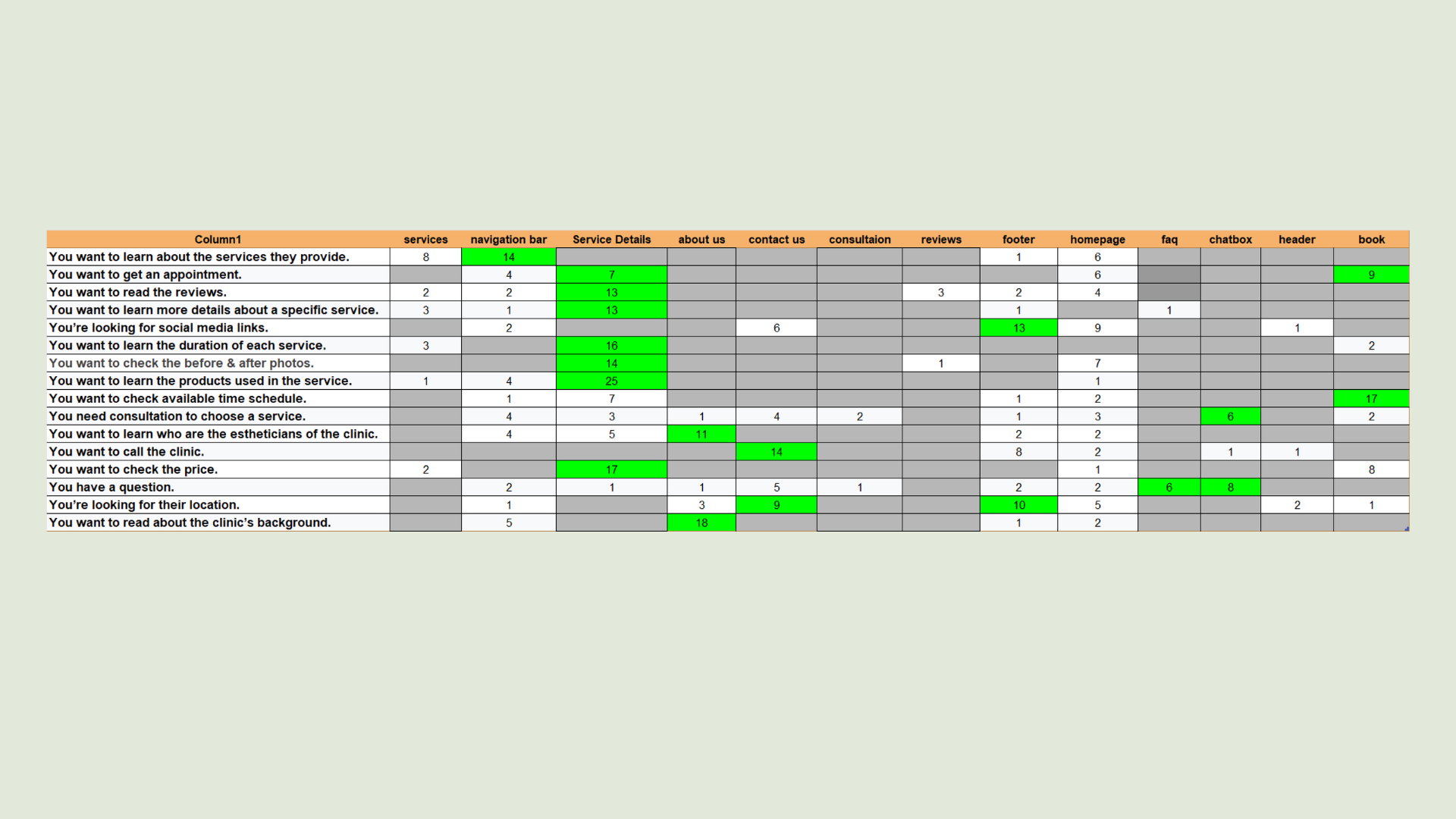
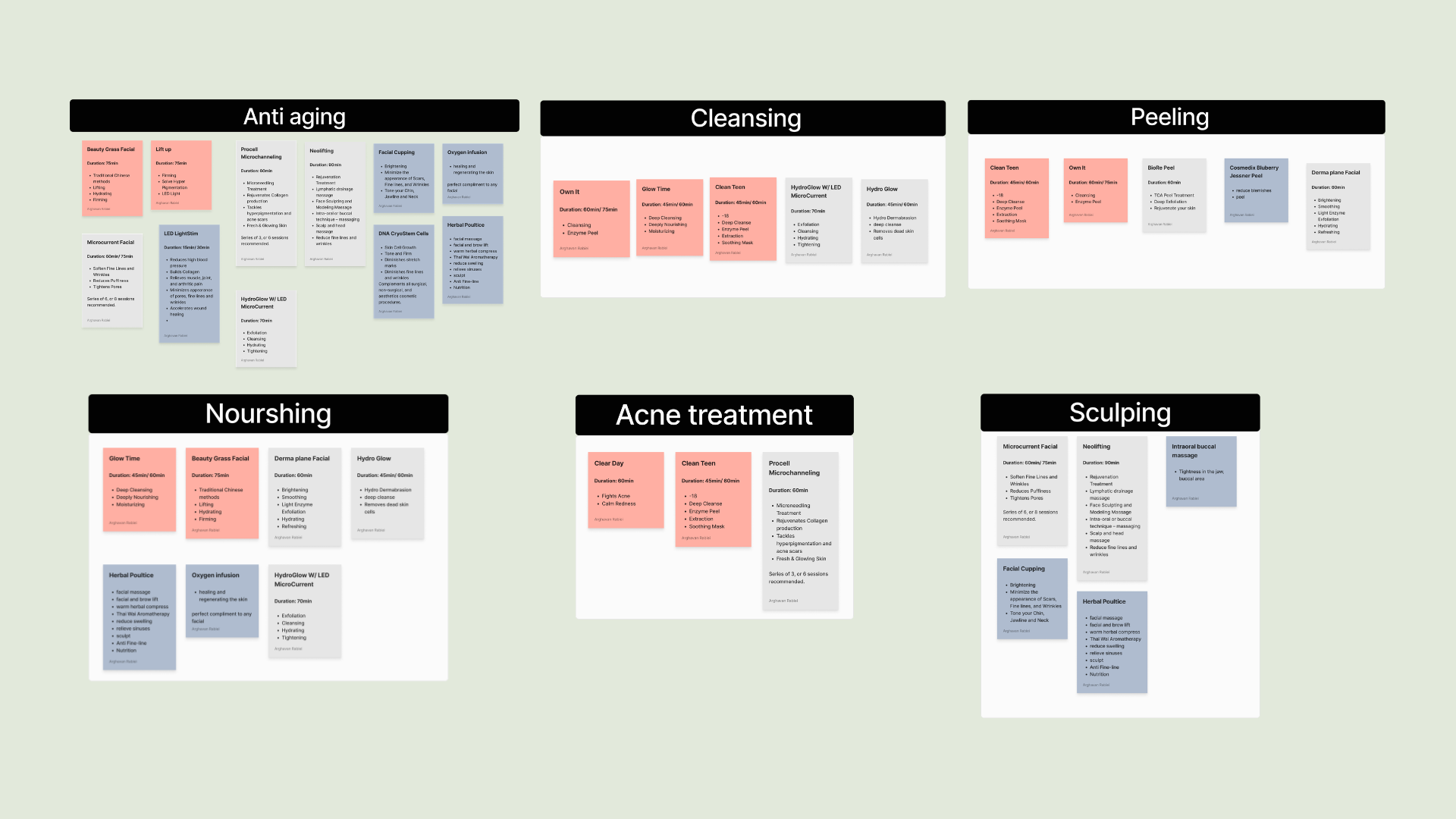
We ran two card sorting exercises with 28 participants each to validate the information architecture before committing to a structure. The first mapped user tasks to navigation locations — revealing where people expected to find things across the site. The second asked participants to group the clinic's treatments freely, surfacing a natural category system that directly shaped the new service navigation.
Site Map
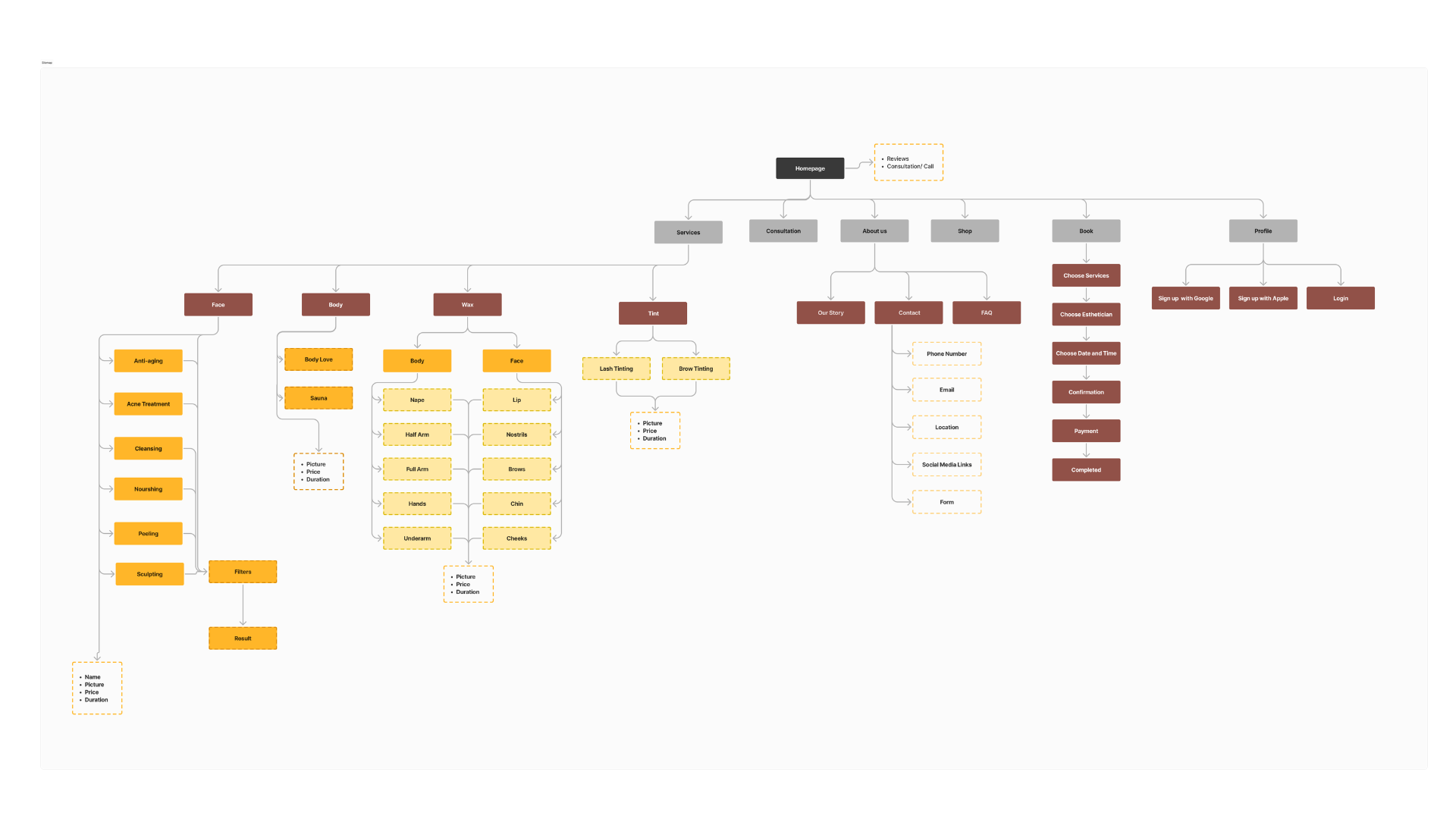
Participants consistently placed treatment-related tasks — reading reviews, checking durations, seeing before & after photos, learning about products — inside a dedicated Service Details page. Booking landed on its own, clinic background went to About Us, and contact tasks split cleanly between a Contact page and the footer. The card sort gave us a clear, user-validated page hierarchy to build from.
Service Categories
Participants grouped the clinic's treatments into six intuitive categories: Anti-Aging, Cleansing, Peeling, Nourishing, Acne Treatment, and Sculpting. This was a significant departure from the existing site's vague structure of "All Services", "Facials + Add-ons", and "Body Love". The new categories gave each treatment a clear home and made the menu scannable for someone who already knew what their skin needed.
06 — Define
With the discovery phase complete, we synthesised the findings into two tools that kept design decisions grounded: personas that captured the real people visiting the site, and a site map that reflected how they actually expected to navigate it.
User Persona
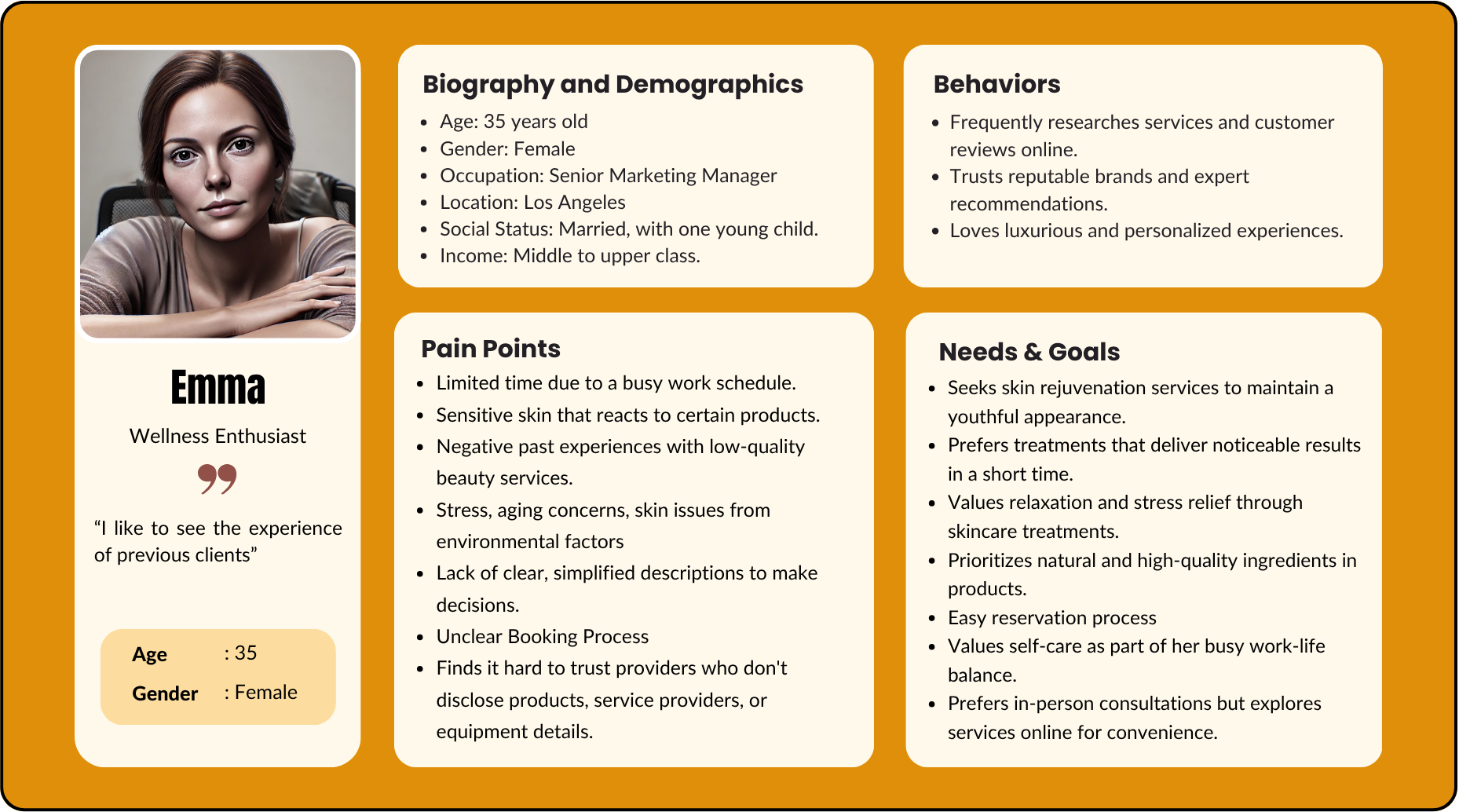
Emma is a 35-year-old Senior Marketing Manager in Los Angeles — busy, discerning, and used to high-quality experiences. She researches thoroughly before committing, reads reviews, and pays close attention to whether a clinic discloses the products and practitioners behind each treatment. Her biggest friction with the existing Saving Faces site: unclear service descriptions, no visible social proof, and a booking flow that felt unreliable. Designing for Emma meant making trust signals impossible to miss and the path to booking frictionless.
Site Map
The card sorting results translated directly into the new site map. Services split into four clear top-level categories — Face, Body, Wax, and Tint — with the six user-defined subcategories (Anti-Aging, Cleansing, Nourishing, Peeling, Acne Treatment, Sculpting) living under Face. Each service detail page surfaces the name, picture, price, and duration users said they needed. Booking became its own dedicated flow: Choose Service → Choose Esthetician → Choose Date & Time → Confirmation → Payment. Reviews and a Consultation option were promoted to the homepage rather than buried in the footer.
07 — Develop
Research translated into design — starting with the visual language, then wireframes that stress-tested the new structure.
Moodboard
Warm neutrals, sage green, skin-close photography, organic textures. The direction: premium but approachable — closer to a skincare editorial than a medical clinic.
Wireframes
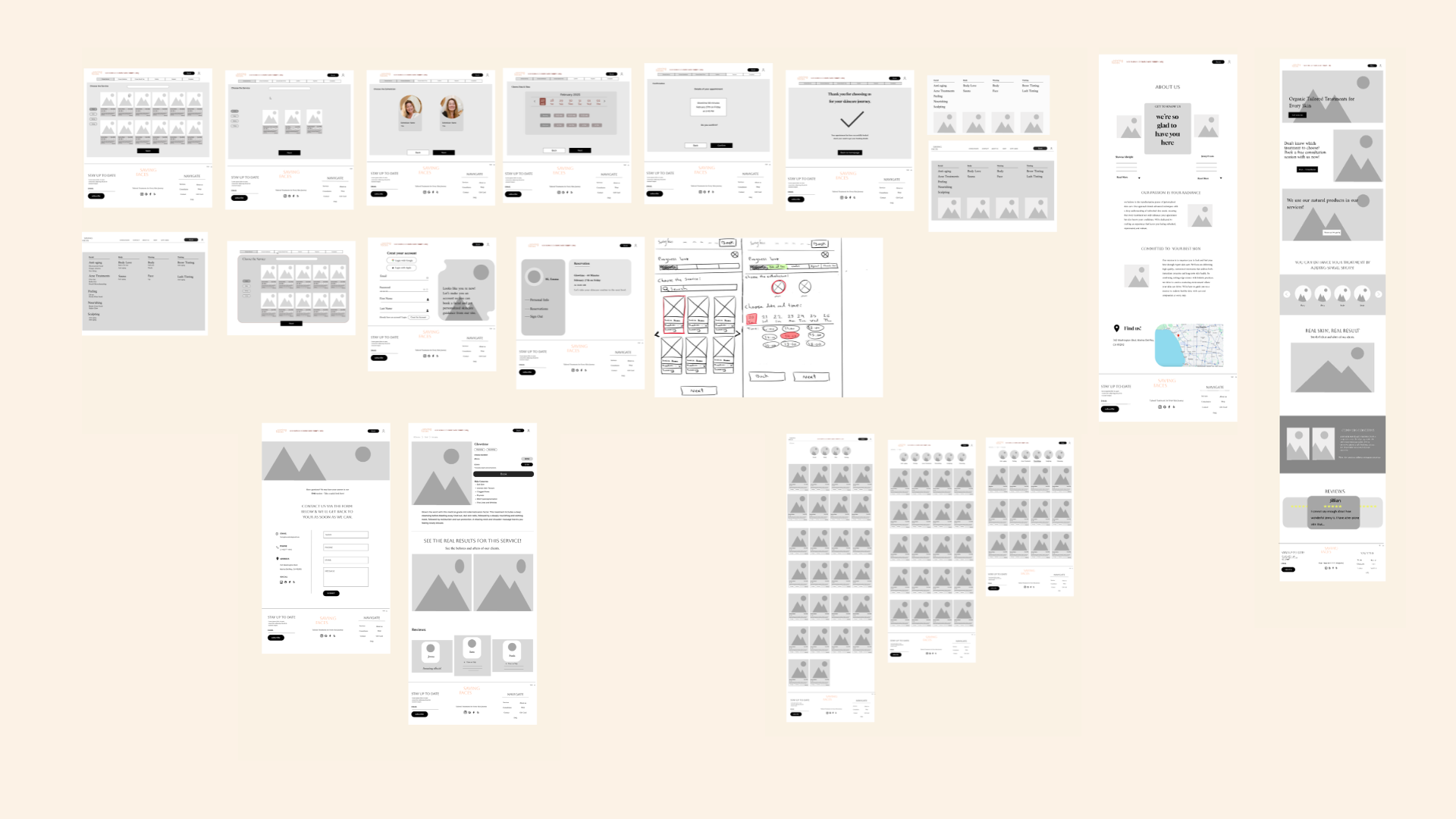
Wireframes covered the full site: homepage, service listings, individual service detail pages, the esthetician profiles, booking flow (service selection, esthetician choice, calendar, confirmation), About Us, reviews, and contact. Keeping everything greyscale at this stage kept the focus on structure, hierarchy, and flow — not aesthetics.
08 — Deliver
Placeholder body text. Show the finished screens and explain the experience.
Caption placeholder
Caption placeholder
09 — Reflection
Placeholder body text. Reflect on the process, what worked, what you'd do differently.
What I took from it
Placeholder — the key takeaway from this project.